
SPICED-AI COMPARISON · UPDATED NOVEMBER 6, 2026
Two attractive profiles. Two chat windows. One subscription budget. Candy AI vs Kupid AI looks like a simple choice—until you start comparing character settings, video tools and what those credits actually buy.
My short answer: I’d start with Candy for a guided multimedia experience, and Kupid for a more hands-on character-building workflow. Both now offer video generation. The useful question is how you want to create, chat and spend.
If you’re still exploring beyond these two, our best AI girlfriend platforms guide gives you the wider shortlist. Here, we’re keeping the spotlight on this particular match-up.
Disclosure: this page contains affiliate links. We may earn a commission if you purchase through them. Our recommendations distinguish earlier review impressions from current official feature checks.
The quick verdict: which one fits you?
Candy AI
My pick if you want character chat with several ways to explore visual content, including a preset-based video builder and a simulated cam experience.
Main trade-off: a subscription doesn’t remove the need to budget for token-based extras.
Kupid AI
My pick if shaping the companion is a big part of the fun, and you want dedicated text-to-video and image-to-video tools alongside chat.
Main trade-off: the current offer uses weekly prices and coins, so compare billing periods carefully.
Candy AI vs Kupid AI at a glance
| What matters | Candy AI | Kupid AI |
|---|---|---|
| Character creation | Guided realistic or anime creation | Realistic or anime, with custom descriptors |
| Conversation | Text and voice features | Text and voice messages |
| Video workflow | Scene presets and eligible chat-image animation | Dedicated text-to-video and image-to-video |
| Cam-style experience | Candy Cam is officially documented | No equivalent verified for this comparison |
| My editorial lean | Explore several companion experiences | Build a more specifically defined character |
| What remains unmeasured | A matched test of memory, generation speed and video quality | |
These are workflow differences, not a lab scorecard. A longer feature list doesn’t automatically mean a better conversation. And having a video button doesn’t tell you whether every clip will match your prompt.
How I put this comparison together
I revisited our Candy AI review and Kupid AI review, then checked the official creators, video documentation and subscription pages on November 6, 2026. The screenshots below come from our earlier reviews.
This update is not a new paid, side-by-side generation test. Earlier hands-on impressions inform the recommendations; official pages establish current availability and advertised pricing. I’m not assigning a new numerical rating or claiming one model remembers more without matching evidence.
Customization: how much of the companion can you shape?
Candy AI: a guided starting point
Sometimes you want to build a character. Sometimes you just want the character-building part to get out of your way. Candy’s guided approach is appealing for that second mood: make a few meaningful choices, establish the vibe, then move toward the conversation.
Our earlier review captured personality choices presented as cards. That makes the setup easy to scan, though a preset label is only a starting instruction—not a guarantee of how every response will sound. Candy’s current character creator still starts with realistic and anime styles.

Kupid AI: more room to describe the character you have in mind
Kupid’s current creator combines appearance choices with voice previews, personality, occupation, relationship and interests. Custom description fields give you room to go beyond the suggested labels. It also documents editing from the profile later.
That’s why I lean toward Kupid for customization. If you already have a particular character concept, being able to describe it matters more than browsing another attractive thumbnail. The practical advantage is control over the brief; it isn’t proof that the AI will obey every detail forever.

My advice: write down three personality traits and one relationship dynamic before opening either creator. If you can express them clearly without fighting the interface, you’ve already learned something useful about which platform suits you.
Chat: chemistry beats a feature checklist
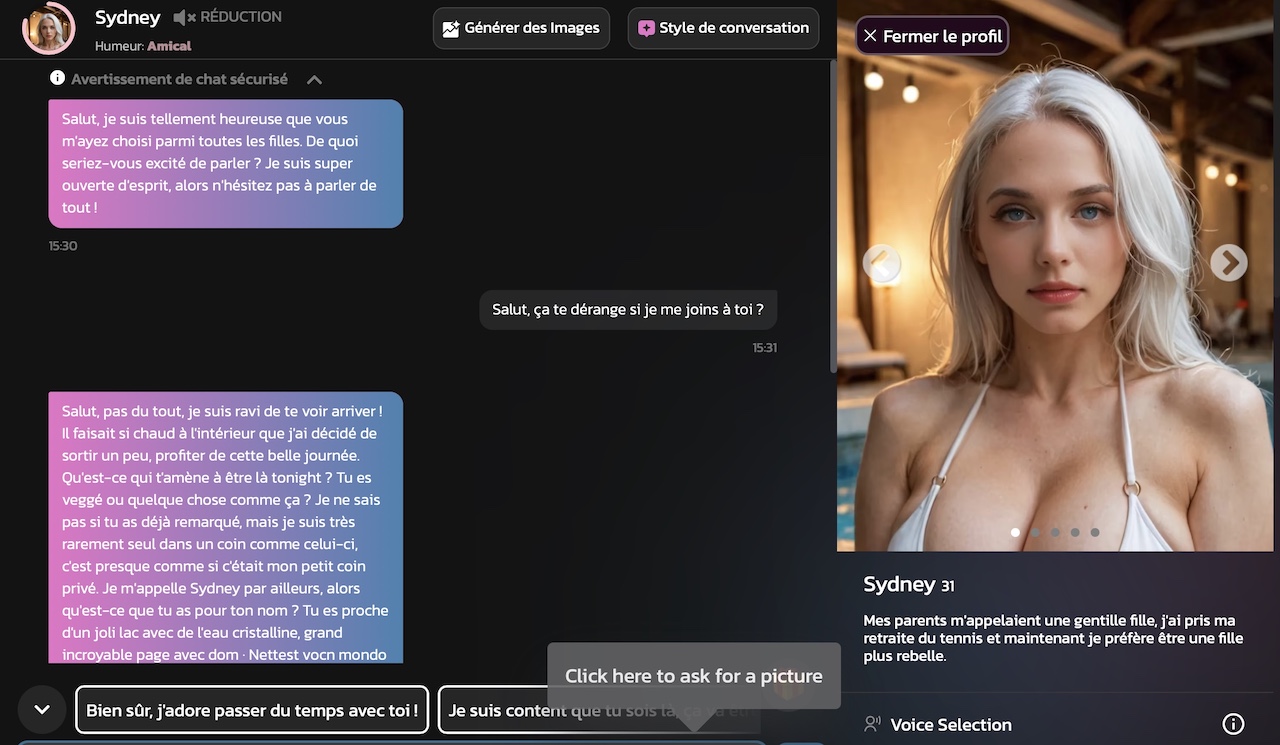
Our earlier reviews described enjoyable conversations on both platforms. Candy came across as a polished companion experience; Kupid stood out for the connection between character creation and chatting. Those impressions are useful context, but they don’t establish a permanent winner as models and settings change.
For me, the real question is: does the character respond to what you actually said? A charming opening line is easy to like. Staying on topic after you change the mood, correct a detail or ask a follow-up is more revealing.
Try the same harmless conversation on each: introduce an interest, ask a specific question, then refer back to that interest later. Notice whether the answer uses the context or simply compliments you again. This is a suggested comparison exercise—not a test result we’re claiming here.
Inside the two chat interfaces

Voice, memory and the claims I wouldn’t overread
Both platforms advertise voice-related features. Candy’s token guide lists voice messages and beta voice calls among token uses; Kupid’s current Pro offer lists voice messages. Voice messages and live calls are different experiences, so don’t treat the terms as interchangeable.
I wouldn’t pick a winner for long-term memory from a marketing promise or one good exchange. We haven’t rerun a controlled memory comparison for this article. If continuity is your priority, use the available access to test a consistent character before committing to a long plan.
Videos: both offer them, but the workflows differ
Here’s the part worth updating: Kupid is not a text-only alternative to Candy. It has official video-generation pages. Any comparison that reduces this choice to “Candy has video, Kupid doesn’t” misses the current product.
Candy: build a scene or animate a chat image
Candy’s Build Your Video documentation describes selecting a character, action, location and partner from available presets. That suits someone who prefers assembling a scene to writing a detailed prompt. Candy also cautions that exact results can vary.
The token guide describes another route: converting a suitable image generated in chat into a video. Not every image is necessarily eligible. Check the options and charge shown in your account before treating a favorite picture as a guaranteed animation.

Kupid: dedicated text-to-video and image-to-video
Kupid separates text-to-video from image-to-video. The former starts with a description; the latter starts with an image. The visible generator includes duration choices, an audio toggle and Standard/HD options.
During this check, the default displayed selection showed 15 coins for Standard and 30 for HD. Treat that as a snapshot of the selected configuration, not a universal rate for every duration or setting. The live generation button is the number to check before you spend.
Candy Cam is a separate reason to consider Candy
Candy Cam adds a stream-style experience with selected characters. The official guide describes public and private modes and makes clear that stream messages are simulated or AI-generated. It is not a webcam connection to a real person.
That gives Candy a documented option for readers who want a feeling of presence alongside conversation. It does not prove every custom character supports the same mode, or that Candy produces better standalone video than Kupid.
My video verdict: Candy for guided scenes and cam-style exploration; Kupid for a dedicated generator workflow. For a wider shortlist, see our AI video generator comparison. There’s no measured output-quality winner in this update.
A scene builder or a custom prompt?
Choose the workflow you’ll actually enjoy using. Check the available controls and generation cost before upgrading.
Affiliate links · Adults 18+ · Check the offer before subscribing.Strengths and trade-offs: what you’re really choosing
Candy AI
Why I’d consider it
- Guided character and scene setup.
- Documented cam-style experience.
- Chat, voice and visual tools in one service.
What to keep in mind
- Extra features can consume tokens.
- Preset choices may feel restrictive if you prefer a detailed brief.
- Introductory pricing and renewal pricing can differ.
Kupid AI
Why I’d consider it
- Custom descriptors within the companion creator.
- Separate text-to-video and image-to-video routes.
- Generation settings visible before creation.
What to keep in mind
- Weekly price presentation needs careful reading.
- Media generation still draws on a coin budget.
- No cam-equivalent feature verified here.
Pricing: compare the bill, not just the biggest number
Candy’s offer is displayed per month; Kupid’s checked offer is displayed per week. Putting those figures next to each other without their units would make this comparison pretty useless. Here’s the offer snapshot from the official pages, checked November 6, 2026.
| Platform / term | Displayed offer | Billing detail |
|---|---|---|
| Candy · 1 month | $9.99 initially | Then $13.99/month |
| Candy · 3 months | $8.99/month | $26.97 quarterly |
| Candy · 12 months | $3.99/month | $47.88 annually |
| Kupid · 1 week | $12.99/week | Weekly option |
| Kupid · 3 months | $6.14/week equivalent | Three-month term; confirm checkout total |
| Kupid · 12 months | $3.43/week equivalent | Annual term; confirm checkout total |
Sources: Candy subscription page and Kupid Pro offer. Candy lists automatic renewal and possible local taxes. Kupid’s fetched offer does not show the exact longer-term charge; check the payment screen and renewal terms for your chosen method. Offers can change.
Tokens versus coins: which gives you more?
The checked Candy plan lists 100 tokens per month; Kupid’s Pro offer lists 100 coins per week. These currencies are not equivalent. You cannot turn that into a reliable “four times more content” claim without matching the cost of each action.
My budgeting rule is simple: estimate your actual routine. Mostly text? Subscription access matters most. Frequent clips, images or voice? Add those expected charges. A low headline price can stop looking low when you repeat a paid action several times a day.
Adult content and privacy: keep the expectations clear
These are adult-oriented companion services, and this comparison is for readers aged 18+. Adult content availability still sits within each service’s rules; “NSFW-friendly” should never be read as “anything goes.”
Neither an AI conversation nor a discreet billing label guarantees anonymity. We haven’t audited either service’s security in this comparison. Read the current privacy and deletion information before sharing sensitive material, and avoid uploading identifying photos or private information you would regret storing online.
Which should you choose for your everyday use?
Choose Candy AI if you want to explore before you fine-tune
I’d point you toward Candy if your ideal session moves between chatting, browsing and trying a visual experience without spending too long designing every detail. The preset-based scene builder and documented cam mode make that recommendation more concrete than a vague “better features” badge.
Choose Kupid AI if the character brief is half the fun
I’d point you toward Kupid if you arrive with a personality, relationship dynamic or visual concept already in mind. Its creator and standalone video routes are a sensible fit for someone who enjoys setting things up and adjusting the result.
Choose neither yet if you only care about one untested result
If your purchase depends on perfect memory, a particular voice or consistently accurate clips, don’t buy a year based on this page alone. Start with the smallest suitable commitment and check that exact requirement. An annual discount is useful only after you know you want the service.
Final verdict: two different ways to build the experience
Candy is my starting recommendation for guided multimedia exploration. Kupid is my recommendation for character-building control. That’s the most useful split supported by our earlier reviews and this feature refresh.
Still undecided? Our Candy AI alternatives and Kupid AI alternatives expand the choice. You don’t have to force a match just because these two made your first shortlist.
Pick your starting point
Candy for guided multimedia exploration. Kupid for a character you want to shape in more detail.
Affiliate links · Adults 18+ · Check the offer before subscribing.Candy AI vs Kupid AI: frequently asked questions
Is Candy AI better than Kupid AI?
Candy is our pick for guided multimedia exploration; Kupid is our pick for character-building control. We have not established a current winner for memory or video output quality.
Does Kupid AI generate videos?
Yes. Its official site offers both text-to-video and image-to-video tools. Generation consumes coins, with the amount depending on the selected settings.
Can Candy AI generate videos?
Yes. Its documentation covers a preset-based video builder and animation of eligible chat-generated images. Check the token charge before generating.
Which has better character customization?
We lean toward Kupid for its combination of character settings and custom descriptors. Candy offers a guided approach that may suit readers who prefer a quicker setup.
Is Candy Cam a real person on a webcam?
No. Candy describes an AI character experience, and its public-stream messages are simulated or AI-generated.
Which is cheaper: Candy AI or Kupid AI?
Candy has the lower advertised subscription entry cost in the checked offers, but the periods differ. Compare the pricing table and budget separately for token or coin spending.
Do subscriptions include unlimited videos?
Do not assume that. Both use virtual currencies for additional actions. Unlimited text chat does not mean unlimited media generation.
Can I try them before a long subscription?
Check the access currently available to your account and the shortest suitable plan. Free limits and promotions can change; this comparison does not promise a fixed free allowance.
Editorial note: official feature and offer checks were completed November 6, 2026. Historical screenshots and impressions are linked to our original reviews. Product availability, prices and generation charges may change.